Deacon Higginson's Game Design Blog

  • Home
  • Year 1
    • 3D Asset Design (400573_A20_T1)
      • Production Piece (3D Rendered Output) & Portfolio
    • 2D Art for Games (440947_A20_T1)
      • Sketchbook of Artwork
    • Introduction to Game Engines (440946_A20_T1)
      • Completed Game & Development Diary
    • Team Project (400572_A20_T2)
    • Introduction to Motion Graphics and Animation (440948_A20_T2)
  • Year 2
    • 3D Character Design (500730_A21_T1)
      • Character Design Portfolio
    • Creative Business: Pitching and Design (551307_A21_T1)
      • Elementor
    • Level Design (551309_A21_T1)
      • Level Development Diary
    • Rapid Prototype Design (551308_A21_T2)
      • RP
    • 3D Character Animation (551310_A21_T2)
      • Design Portfolio
    • Professional Practice: Production & Development (500728_A21_T2)
      • Team Project
      • Development Log
      • Class Work
  • Year 3
    • Major Project (601165_A22_T12)
      • Proposal
      • Dev Log
      • Practical
    • Visual FX and Post Production (601166_A22_T1)
      • Visual Effects
    • Digital Storytelling (661893_A22_T1)
      • Production Dossier
    • Immersive Design (661841_A22_T2)
      • Portfolio and Production Piece
    • The Designer Self (601164_A22_T2)
  • Industry Portfolio
  • About me!

Chasing player AI

Published by higginson2020 on April 1, 2022April 1, 2022

A major part of the Run Rabbit Run is the player hiding and running from enemies. To enable enemies to detect and chase the player, I created an enemy chase AI.
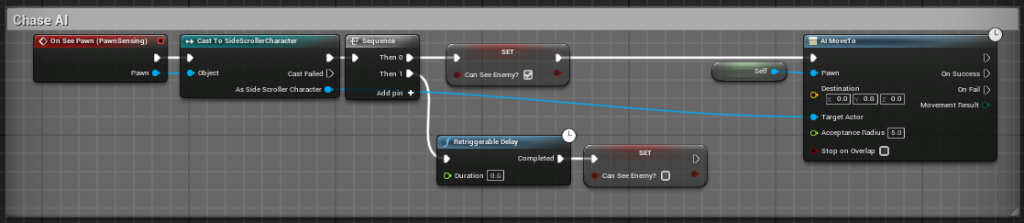
  • This blueprint causes the AI to detect the player and chase them when detected. It will stop chasing when they can’t detect them.
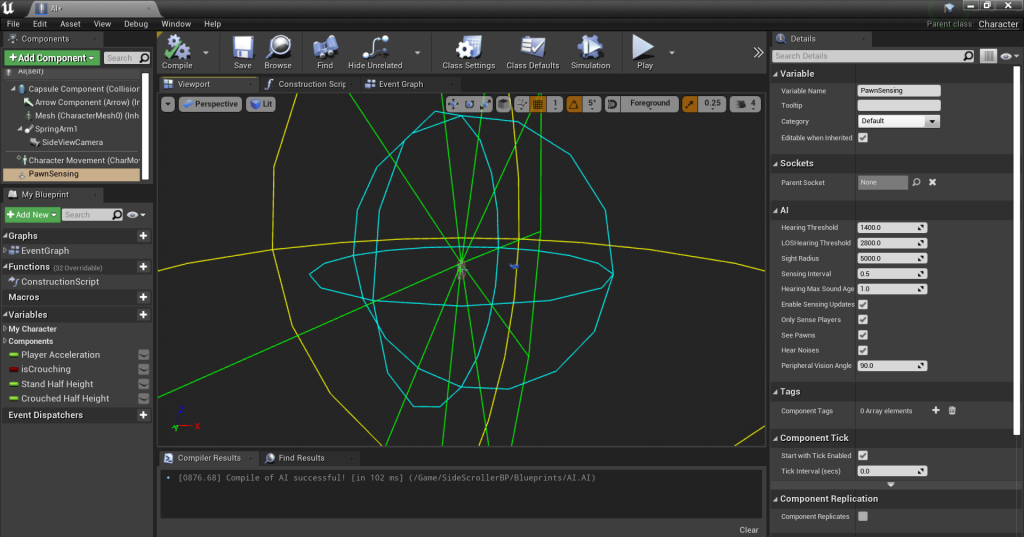
  • PawnSensing allows the AI to detect when the player is within a specific radius.
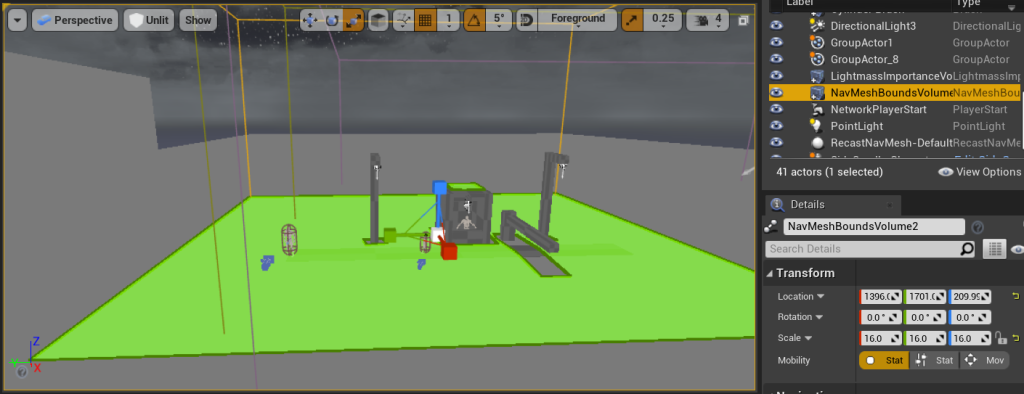
  • NavMeshBounds defines the area in which the AI can move.
Categories: Class Work

Categories
  • Home
  • Year 1
    • 3D Asset Design (400573_A20_T1)
      • Production Piece (3D Rendered Output) & Portfolio
    • 2D Art for Games (440947_A20_T1)
      • Sketchbook of Artwork
    • Introduction to Game Engines (440946_A20_T1)
      • Completed Game & Development Diary
    • Team Project (400572_A20_T2)
    • Introduction to Motion Graphics and Animation (440948_A20_T2)
  • Year 2
    • 3D Character Design (500730_A21_T1)
      • Character Design Portfolio
    • Creative Business: Pitching and Design (551307_A21_T1)
      • Elementor
    • Level Design (551309_A21_T1)
      • Level Development Diary
    • Rapid Prototype Design (551308_A21_T2)
      • RP
    • 3D Character Animation (551310_A21_T2)
      • Design Portfolio
    • Professional Practice: Production & Development (500728_A21_T2)
      • Team Project
      • Development Log
      • Class Work
  • Year 3
    • Major Project (601165_A22_T12)
      • Proposal
      • Dev Log
      • Practical
    • Visual FX and Post Production (601166_A22_T1)
      • Visual Effects
    • Digital Storytelling (661893_A22_T1)
      • Production Dossier
    • Immersive Design (661841_A22_T2)
      • Portfolio and Production Piece
    • The Designer Self (601164_A22_T2)
  • Industry Portfolio
  • About me!

Related Posts

Class Work

Blocking out the level

I have created a simple blockout of the playable level, with lighting, in Unreal Engine. All screenshots were taken by me in Unreal Engine.

Class Work

Player crouching

To allow the player to hide from enemies and enter smaller areas, I have added the ability for the player to crouch. To make the player character crouch when the collider does, I added crouching Read more…

Class Work

Lighting

As the game follows a noir theme, I followed this when creating the lighting. By using a sky sphere, exponential height fog and post processing volume, I have created an extremely dark environment.

  • Elementor
  • Industry Portfolio
Hestia | Developed by ThemeIsle